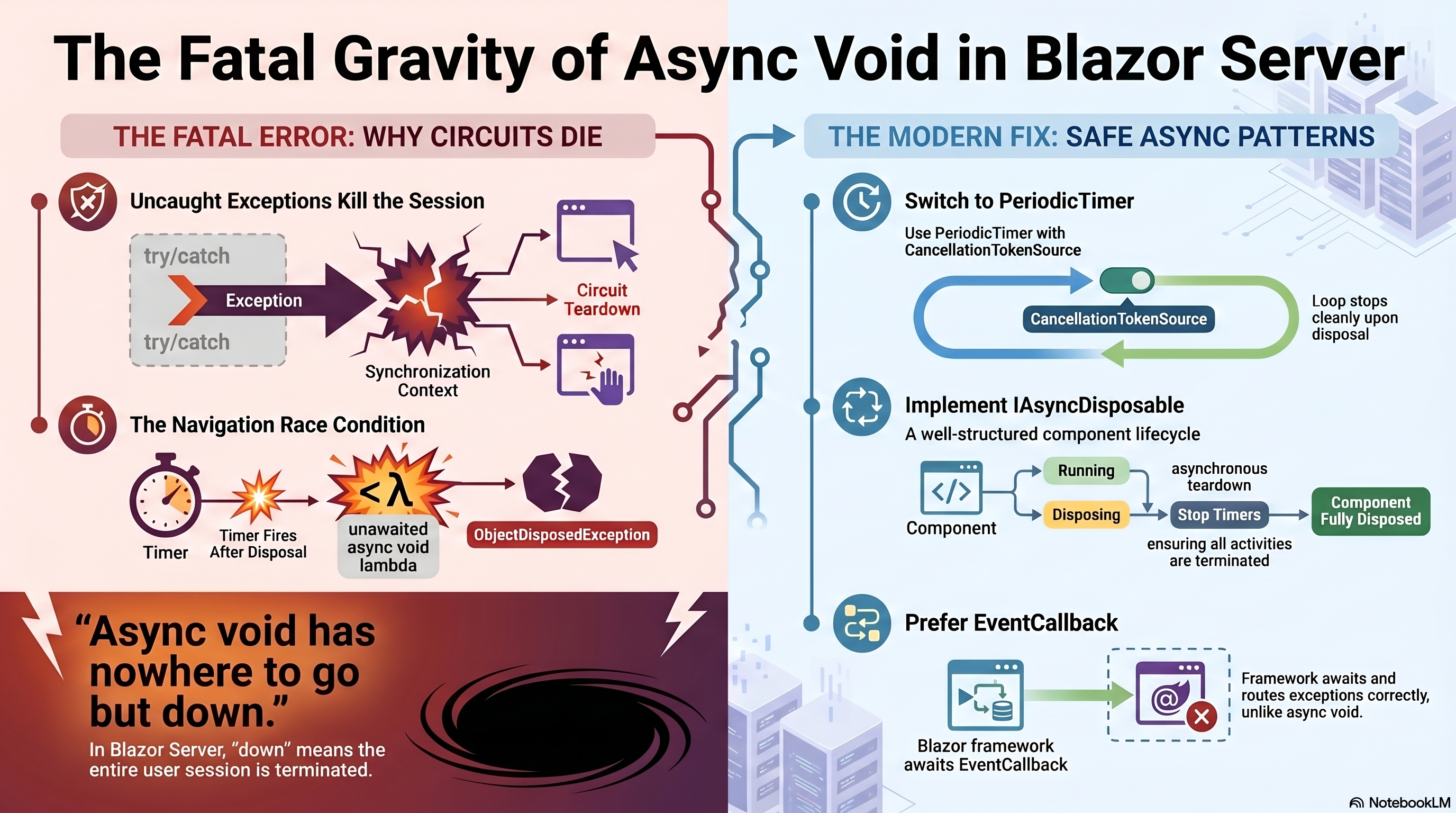
Blazor Server's async void Will Kill Your Circuit

dotnetcs · Blazor Server · Deep Dive · 5 min read · C# 13 · .NET 9
Your Blazor Server page polls the server every 30 seconds. The user reads it, then navigates away to another page. And that's the moment their entire session dies — the red banner, full reload, gone.
No stack trace in the UI. No obvious repro. The bug is hiding in two little words: async void.
Table of Contents
- The Innocent-Looking Setup
- Why It Really Breaks — Two Mechanisms
- The Fix: Three Layers of Discipline
- The Modern Way: PeriodicTimer + Cancellation
- Rules to Live By
1. The Innocent-Looking Setup
Here's the setup: a live inbox component that polls an API on a timer and reloads when the user switches context. Totally normal Blazor. It works in every demo. In production, random sessions just… die.
protected override async Task OnInitializedAsync()
{
    _timer = new System.Timers.Timer(30_000);
    _timer.Elapsed += async (_, _) => await InvokeAsync(LoadAsync);   //  #1
    _timer.AutoReset = true;
    _timer.Start();
}

// Triggered when user switches context
private async void HandleKidSwitched()                                 //  #2
{
    await LoadAsync();
    await InvokeAsync(StateHasChanged);
}
Two time bombs. The Timer.Elapsed handler is an async lambda — which implicitly returns void. And the context-switch handler is an async void method. Both look harmless. Together they're a session-killer.
2. Why It Really Breaks — Two Mechanisms
Mechanism #1 — async void exceptions are unobservable
When a method returns Task, the caller can await it and catch whatever it throws. An async void has no Task to await. So when it throws, the exception bypasses every try/catch you wrote and flies straight to the synchronization context as unhandled.
In Blazor Server, an unhandled exception on the circuit's synchronization context terminates the circuit. Not one component — the user's entire live session, server-side, is torn down. That's the red banner: "An unhandled error has occurred. Reload."
async void throws → no Task to catch it → unhandled on SyncCtx → circuit terminated 💀
Mechanism #2 — The post-dispose race condition
System.Timers.Timer fires its Elapsed event on a thread-pool thread — off Blazor's render thread. That's why we wrap the body in InvokeAsync, to marshal back onto the component's context. But here's the race condition nobody talks about:
The timer can fire after the component is already disposed — right when the user navigates away. Now LoadAsync or StateHasChanged throws ObjectDisposedException or JSDisconnectedException inside that async void lambda — and that exception has nowhere to go except the circuit context.
⚡ Why it's so hard to reproduce: The race window is tiny — a few milliseconds between the timer tick and disposal. In a demo with one user and no navigation, you'll never see it. In production with real users clicking around, it's Russian roulette on every poll interval.
3. The Fix: Three Layers of Discipline
You can't always avoid async void — event handler signatures sometimes force it. When you're stuck with it, treat it as a containment boundary: nothing escapes.
Layer 1 — Absorb everything in the timer lambda
_timer.Elapsed += async (_, _) =>
{
    // async lambda on a Timer — must absorb everything.
    // A tick after dispose takes down the circuit if we don't.
    try { await InvokeAsync(LoadAsync); }
    catch (Exception ex) { _logger.LogWarning(ex, "Poll tick failed — component likely disposed"); }
};
Layer 2 — Same discipline for async void handlers
private async void HandleKidSwitched()
{
    try
    {
        await LoadAsync();
        await InvokeAsync(StateHasChanged);
    }
    catch (Exception ex) { _logger.LogWarning(ex, "Context switch handler failed"); }
}
Layer 3 — IAsyncDisposable: stop before you dispose
// IAsyncDisposable — not IDisposable — because we're tearing down async resources
public async ValueTask DisposeAsync()
{
    _timer?.Stop();      // ← stop FIRST — no tick fires mid-teardown
    _timer?.Dispose();
    if (_hub is not null)
    {
        try { await _hub.DisposeAsync(); } catch { }
    }
}
🔑 The order matters:
Stop()thenDispose()— not the other way around. CallingDispose()first on some runtimes still lets a pending tick through. Stop eliminates the race; Dispose releases the handle.
4. The Modern Way: PeriodicTimer + Cancellation
System.Timers.Timer predates async and fights it at every turn. If you're on .NET 6+, reach for PeriodicTimer instead — it was designed specifically for async loops and eliminates the thread-pool-thread mismatch entirely.
private readonly CancellationTokenSource _cts = new();

protected override void OnInitialized() => _ = PollLoopAsync();

private async Task PollLoopAsync()
{
    using var timer = new PeriodicTimer(TimeSpan.FromSeconds(30));
    try
    {
        while (await timer.WaitForNextTickAsync(_cts.Token))
            await InvokeAsync(LoadAsync);
    }
    catch (OperationCanceledException) { /* disposed — expected, swallow it */ }
    catch (Exception ex) { _logger.LogWarning(ex, "Poll loop failed"); }
}

// IDisposable is enough now — synchronous cancellation kills the loop
public void Dispose() => _cts.Cancel();
Now cancellation is your teardown mechanism. The loop sees the token, stops cleanly, and the post-dispose race simply cannot happen. There's no thread-pool thread firing a stray tick.
And whenever you control the event signature, prefer EventCallback over async void — the framework awaits it and routes exceptions through the normal Blazor error pipeline.
5. Rules to Live By
| # | Rule | Why |
|---|---|---|
| 01 | Every async void body gets a top-level try/catch |
It has nowhere to throw safely — so it must never throw |
| 02 | Timer.Elapsed needs both InvokeAsync and try/catch |
Marshal to render thread AND absorb post-dispose ticks |
| 03 | Implement IAsyncDisposable, call Stop() before Dispose() |
Eliminates the race window; tears down async resources cleanly |
| 04 | Prefer PeriodicTimer + CancellationToken on .NET 6+ |
Cancellation as teardown — the race can't happen by design |
| 05 | Prefer EventCallback over async void |
Framework awaits it; exceptions route correctly |
💬 One line to remember: "async void = the exception has nowhere to go but down. In Blazor Server, down means the circuit."
if it did, check out the next post in the series: SignalR pushes that don't leak data to users who shouldn't see it.
#blazor #csharp #dotnet #aspnetcore #webdevelopment